 Tiny Tally
A baby tracker widget
for your iPhone.
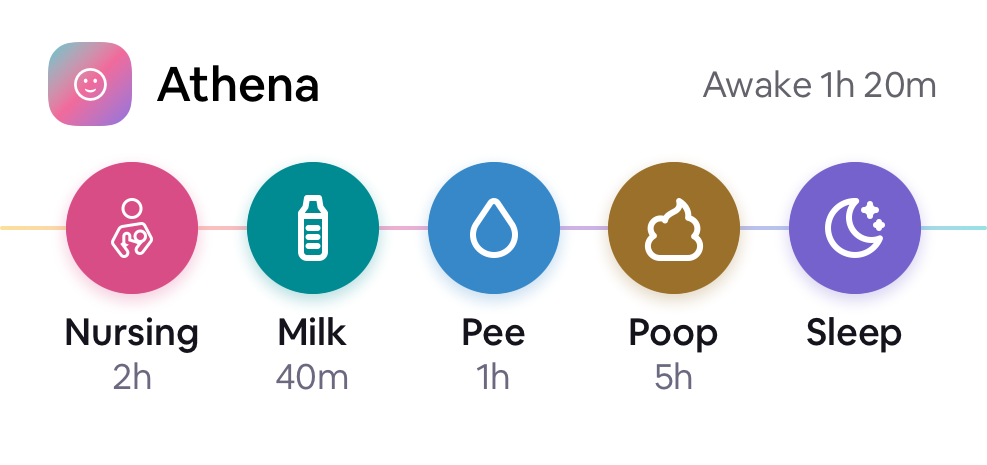
Keep your baby's care actions on the Home Screen. Tiny Tally's widget gives you quick logging and a view of the last feed, without opening the app for every entry.
Add Tiny Tally to your Home Screen
You need Tiny Tally installed on an iPhone with iOS 18 or later. Open the app, set up your baby's profile and start your trial or restore your purchase before logging care.
- On your Home Screen, press and hold an empty space until the icons start moving.
- Choose Edit, then Add Widget.
- Find Tiny Tally in the widget gallery and add its medium widget.
- Move it somewhere convenient, then choose Done.
Apple also provides instructions for adding and editing iPhone widgets.
Choose the baby and care actions
Press and hold the Tiny Tally widget, choose Edit Widget, and select the baby whose care you want to see. Check the baby's name before logging an activity, especially if you track more than one baby.
In Tiny Tally, choose and reorder the five quick actions for that baby. The widget uses those choices, so your everyday actions stay close.
Log a change or start a timer
Use the diaper actions to record a change. The milk action lets you choose an amount; nursing and sleep use timers that you finish when the session ends. The available controls depend on your configured actions and any active session.
For a past activity, a correction or more detail, open the app and review the baby's History. A quick entry is useful when it records what actually happened; you can return to the details later.
Home Screen widgets and Live Activities
The Home Screen widget is something you add and keep in place. A Live Activity follows an ongoing nursing or sleep session on the Lock Screen. You don't add a Live Activity through the Home Screen widget gallery.
Learn more about nursing and feeding records or sleep timers. The same saved care records can be shared with an invited caregiver.
If the widget needs attention
If it asks you to open Tiny Tally, follow that prompt and check the selected baby and your trial or purchase status. Shared profiles also need account access. Use the app's History to check a saved entry before trying the same action again.
The widget is included with Tiny Tally's seven-day trial and one-time unlock. If you still need help, contact Tiny Tally support.

Keep care close.
Start with the activities you use most and a place for the details you want to remember.
Get Tiny Tally on the App Store